
Lemma patterns
A lemma pattern describes the sequence Webtool looks for in tokenized text. It can require an exact spelling, accept the registered forms of a lemma, or refer to a slot or another construction. The pattern is separate from the lemma's Name and from the sense description of any lexical unit that uses it.
This reference describes the notation in Pattern (BNF) in the Lemma editor. For an example of creating an entry, see the Lemmas guide. The editor's diagram shows what the pattern compiler read; not every symbol the compiler can draw is implemented by the current lexicon matcher.
Read a pattern from left to right#
The generated pattern for the multiword expression janela solar is:
{=janela} {=solar}
Read it as “a registered form of the lemma janela, followed immediately by a registered form of the lemma solar.” Follow the arrows from START through the two slots to END. The slots do not enforce agreement: each is checked independently, so the pattern alone does not require both words to be singular or both to be plural.
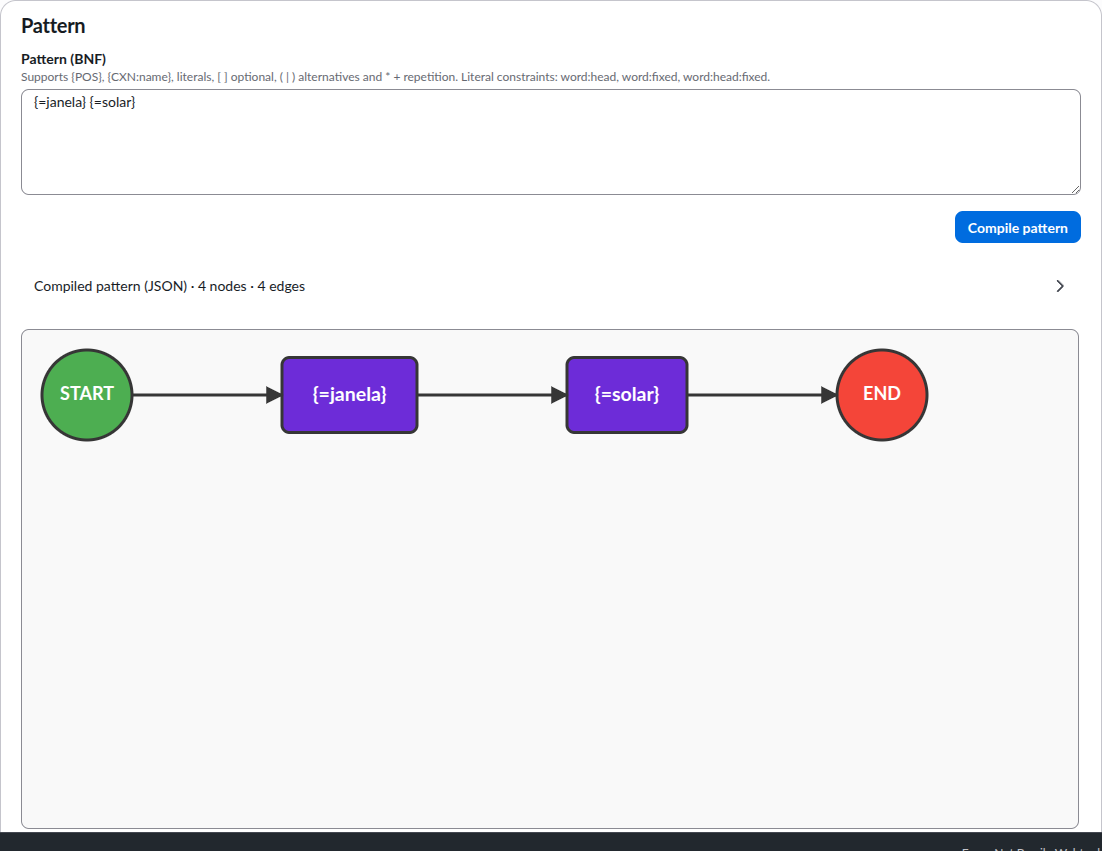
Webtool generates an initial pattern when you create an ordinary multiword
lemma. In that generated pattern, a plain word with a lemma of the same name in
the language becomes a {=…} slot; other words stay literal. An internal hyphen
becomes an optional hyphen [-], as in {=calar} [-] {=se}. For a new entry,
review the generated pattern rather than assuming every component should inflect.
Existing entries can have different patterns, even when their names look alike.
Exact spellings and lemma slots#
| Notation | How to read it |
|---|---|
foto |
Match this spelling, not fotos. Matching ignores case, not accents. |
{=foto} |
Accept registered forms of any lemma named foto in this pattern's language. |
{=foto:NOUN} |
Accept registered forms only from entries named foto with UD part of speech NOUN. |
{=tirar:VERB} foto |
Allow registered inflections of tirar, but keep foto exact. |
{=tirar:VERB} {=foto:NOUN} |
Allow registered forms in both positions. |
For example, tirar foto does not match tirou foto. {=tirar:VERB} foto can
match tirou foto if tirou is a registered form of tirar, but it does not
by itself match tirou fotos. To allow fotos, use a lemma slot for that
position or register the intended expression variant where supported.
{=name:POS}filters the lexicon entries that supply forms. It does not ask the sentence parser to tag the matching token with that POS. A spelling shared by different lemmas can still match if it is a form of the selected one.- The slot name is normalized to lowercase, and its POS suffix to uppercase. If there is no eligible form-bearing lemma when the pattern is built, the slot falls back to the exact spelling. If you create the missing lemma later, recompile the pattern. New forms added to a lemma already linked by the slot can match without rewriting the pattern.
- In some existing patterns, an underscore groups a multiword spelling into a
single reference:
visto_quelooks upvisto queas a form or an existing MWE. It is not the same as writing two separate literal positions,visto que.
A literal can carry :head, :fixed, or both. For example, novo:head
marks novo as the head, de:fixed marks de as fixed, and
novo:head:fixed sets both flags. :head does not allow inflection. Ordinary
literals are already exact by default; :fixed explicitly marks the position
for an exact-form check. These suffixes belong to literals, not lemma slots.
An entry's Forms and its Pattern are related but distinct. For supported fixed patterns, registered word-for-word variants can also be recognized. Do not assume that every phrase in Forms, especially one with a different token count, is recognized by the matching graph. Check the variants you need in context.
Sequences, optional elements, and alternatives#
| Notation | How to read it |
|---|---|
por causa de |
Match all three spellings in order, at adjacent positions. |
A [B] C |
Match A C or A B C. Skip the bracketed part or match it once. |
[de {=casa:NOUN}] |
The whole sequence beginning with de is optional. |
calar [-] se |
The hyphen may be present or absent as a token between the two spellings. |
(por | para) isso |
Choose por or para, then match isso. |
(por causa de | a fim de) |
Choose one of two complete sequences. |
(A B) |
Group A B as one unit, without making it optional. |
A, B, and C in this table stand for pattern elements. Use parentheses
around alternatives: write (por | para), not a bare por | para. If a
modifier follows a group, it applies to that group rather than its last word.
A bypass in the compiled diagram represents an optional path; parallel paths
represent alternatives. Don't use alternative order as a priority rule.
POS slots and construction references#
These are for patterns on construction lemmas, whose names start with $.
Ordinary MWE recognition uses spellings and lemma forms; it does not use the
construction pass that matches POS tags and composes references.
| Notation | How to read it |
|---|---|
{NOUN} |
A token tagged NOUN by the sentence parser. This says nothing about its spelling. |
{VERB:inf} |
A VERB constrained to VerbForm=Inf. |
{NOUN:Number=Plur} |
A NOUN constrained to plural. |
{VERB:Tense=Past,VerbForm=Part} |
A VERB with both listed features. |
{PRON:deprel=expl,Number=Sing} |
A PRON with base dependency relation expl and singular number. |
{$np} |
A span matched by the construction lemma named $np. |
Use uppercase Universal Dependencies (UD) POS tags, such as NOUN, VERB,
ADJ, ADV, ADP, DET, PRON, and NUM. The verb-form shorthands are
inf (infinitive), fin (finite), ger (gerund), and part (participle).
Separate constraints with commas; all recognized constraints must hold. Use
registered UD features and base relation names: a token labeled obl:tmod
is checked as obl. An unknown feature or relation may be ignored rather
than rejected, so check that the pattern rejects the tokens you meant to exclude.
For a reusable constrained position, define it as a one-slot construction
(e.g. $infinitive with pattern {VERB:inf}), then reference it as
{$infinitive} inside a larger pattern. An inline constrained POS slot in a
sequence can fall back to plain POS matching if there is no corresponding
constrained construction. The reference must name an existing, built
construction. Use {$name}, not the older {CXN:name} or {CXN#123} notation.
For alternatives over POS tags, write ({DET} | {NUM} | {ADJ}), not a list of
tags inside one pair of braces.
Lemma type slots#
In a $ construction, {TYPE:focus} matches a word or already recognized
multiword span with a focus lemma candidate. {TYPE:focus:ADV} also requires
that same candidate's stored lemma POS to be ADV. This is not the same as an
ordinary {ADV} slot, which uses the sentence parser's POS tag.
For example, {TYPE:focus:ADV} {$np} reads as “a focus adverb followed by a
match of $np.” Type slots use Webtool's lemma classification, not frame or
LU types. A lemma with no type does not match. A form with multiple eligible
readings can match more than one type; the slot does not choose a sense for it.
Ordinary multiword patterns cannot contain type slots, but a type slot in a
construction can consume the full span of an already recognized lexical MWE.
Notation you may see in older patterns#
The compiler can represent the following in the diagram. Do not rely on these notations for token matching in the current Lemma editor, even if compilation succeeds.
| Notation | What it expresses in the compiled pattern | Limit in the current lexicon matcher |
|---|---|---|
{*} |
A wildcard intended to consume one token. | Not available as a working wildcard position. Use a supported, more specific slot or explicit alternatives. |
{CE:Head}, {NOUN@Head}, {VERB:inf@Pred} |
A construction-element (CE) role on its own or combined with a POS slot. | The lexicon matcher does not implement these CE slot checks. |
{$np@Arg} |
A reference to $np carrying the CE label Arg. |
The reference can be resolved, but the CE label is not a match constraint. |
A*, A+ |
Zero or more, or one or more, in the compiler diagram. | The lexicon graph builder strips repetition control nodes; don't assume an unbounded or greedy match. |
<A> |
Marks an element as mandatory in the compiled notation. | Does not insert a missing token or create a ghost node in lexicon matching. Use [A] when a supported element may actually be absent. |
CE labels in this syntax are construction roles (such as Head, Mod,
Pred, and Arg), not the frame-element labels assigned in FE annotation.
Review the pattern before relying on it#
- Decide which positions must keep their spelling and which can take registered lemma forms. Use a POS slot only when any word in that category is intended and you are authoring a construction.
- Group alternatives explicitly and balance each bracket. Put explanations
outside the pattern field; do not paste examples with inline
#comments. - After editing Pattern (BNF), click Compile pattern to save the text and rebuild the graph. Compare the resulting paths with what you intended. If compilation fails, correct the text and compile again. The previous saved pattern remains in place.
- Check real text with both expected matches and near misses. Include inflections, homographs, omitted optional tokens, or hyphens where relevant. A successfully compiled diagram is not proof that those cases match.